Runs your sketch
Arduino
Brain
Loading part…
count events from a sensor
Count visitors with a button; store the total in a variable.
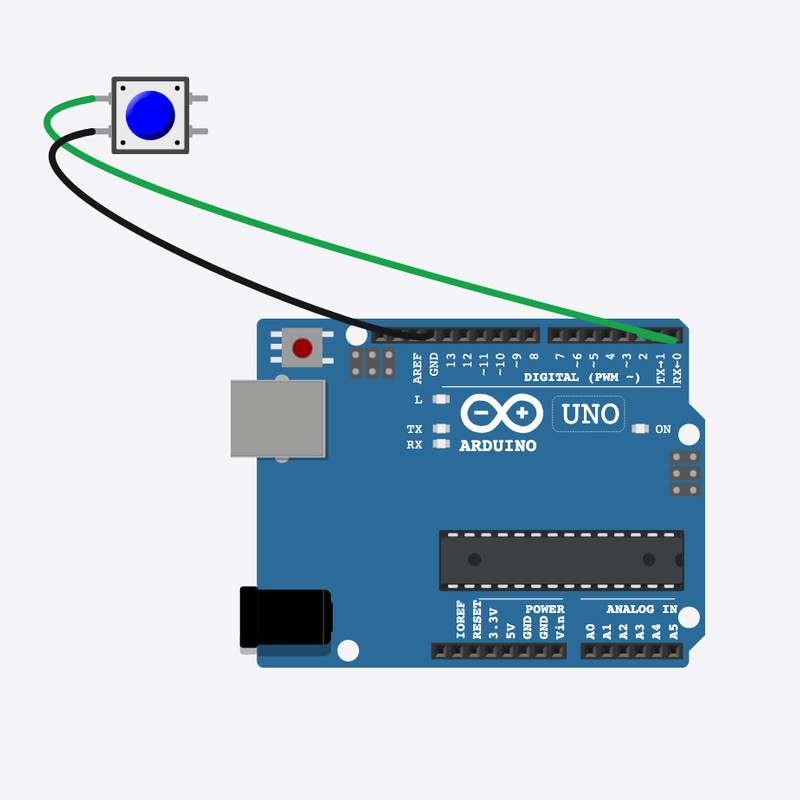
Pin connections
| Part 1 | Part 2 | |
|---|---|---|
Pushbutton pin 1 | → | Arduino pin 2 |
Pushbutton pin 2 | → | Arduino GND |
Count every visitor!
Each button press adds 1 to visitors — like a shop door counter.
Stores count foot traffic; museums track daily visitors with the same idea.
The problem
You need a running total that only goes up when someone arrives.
Think of it like
Like clicking a counter each time someone walks through the door.
Runs your sketch
Arduino
Brain
Detect arrival
Button stands in for a door sensor — press simulates one visitor.
if (digitalRead(SENSOR_PIN) == LOW)
Add one visitor
++ is shorthand for visitors = visitors + 1 — same idea, shorter code.
visitors++;
Show daily total
Print the running total, debounce, then loop() waits for the next visitor.
Serial.print("Visitors today: ");
Serial.println(visitors);
Then loop back to step 1
Follow these steps in order. Match the wires to the colors shown.
Place Arduino
Place the Arduino (uno) on the breadboard.
Arduino placed!
Visitor total variable
const int SENSOR_PIN = 2;
int visitors = 0;
visitors starts at 0 and only increases — it remembers all arrivals today.
Sensor setup
  pinMode(SENSOR_PIN, INPUT_PULLUP);
  Serial.begin(9600);
  Serial.println("Visitor counter ready");
}
void loop() {
Pin 2 is INPUT_PULLUP — ready to detect each new visitor.
Increment on arrival
    visitors++;
    Serial.print("Visitors today: ");
    Serial.println(visitors);
    while (digitalRead(SENSOR_PIN) == LOW) {
      delay(30);
    }
    delay(200);
  }
  delay(20);
}
Press → visitors++ → print → wait for release → loop() again.
const int SENSOR_PIN = 2;
int visitors = 0;
void setup() {
  pinMode(SENSOR_PIN, INPUT_PULLUP);
  Serial.begin(9600);
  Serial.println("Visitor counter ready");
}
void loop() {
  if (digitalRead(SENSOR_PIN) == LOW) {
    visitors++;
    Serial.print("Visitors today: ");
    Serial.println(visitors);
    while (digitalRead(SENSOR_PIN) == LOW) {
      delay(30);
    }
    delay(200);
  }
  delay(20);
}
Q1. What is a variable?
Q2. What does visitors++ do?
Start with 5 visitors already — change int visitors = 0 to int visitors = 5.
Hint: Line 2.
Wait longer between counts — change delay(200) to delay(400) after a visitor.
Hint: Line 18 inside the if block.
A line-by-line tour of the sketch — the same steps as in Robo Gurukul Studio.
Program overview
Technical
Sketches have globals, then setup() once, then loop() forever.
In this project
Count visitors with a button; store the total in a variable.
Why here
Read from top to bottom. Hover words or lines for help!
const int SENSOR_PIN = 2;
int visitors = 0;
setup()
Technical
Runs one time when the board turns on.
In this project
Sets up pins and libraries for Visitor Counter.
Why here
One-time setup belongs here—not in loop().
void setup() {
  pinMode(SENSOR_PIN, INPUT_PULLUP);
  Serial.begin(9600);
  Serial.println("Visitor counter ready");
}
loop()
Technical
Runs again and again after setup() is done.
In this project
This is the main action you see in Visitor Counter.
Why here
Repeating work (blink, read sensors) goes here.
void loop() {
  if (digitalRead(SENSOR_PIN) == LOW) {
    visitors++;
    Serial.print("Visitors today: ");
    Serial.println(visitors);
    while (digitalRead(SENSOR_PIN) == LOW) {
      delay(30);
    }
    delay(200);
  }
  delay(20);
}
Try this: Change numbers in loop(), then compile and run the simulator.
pinMode
Technical
Tells a pin if it listens or drives something.
In this project
Gets the Visitor Counter circuit ready in the simulator.
Why here
Goes in setup() because we only set pins once at the start.
pinMode(SENSOR_PIN, INPUT_PULLUP);
digitalRead
Technical
Checks if a pin is ON or OFF.
In this project
Reads buttons or sensors in Visitor Counter.
Why here
Goes in loop() so we can react when something changes.
if (digitalRead(SENSOR_PIN) == LOW) {delay
Technical
Waits for some time. Nothing else runs during the wait.
In this project
Controls speed so you can see Visitor Counter in the simulator.
Why here
Right after an action that should stay the same for a moment.
delay(30);
begin
Technical
Starts talking to the computer screen (serial monitor).
In this project
Lets Visitor Counter print debug messages.
Why here
Goes in setup() once before any Serial.print.
Serial.begin(9600);
Technical
Sends text to the serial monitor without a new line.
In this project
Shows values from Visitor Counter on the screen.
Why here
In loop() or setup() when you want to see what the board is doing.
Serial.print("Visitors today: ");println
Technical
Sends text to the serial monitor and starts a new line.
In this project
Prints one line of output for Visitor Counter.
Why here
In loop() when each reading should appear on its own line.
Serial.println("Visitor counter ready");