Runs your sketch
Arduino
Brain
Loading part…
random() triggered by a button
Roll a random number 1–6 on a 7-segment display when you press a button.
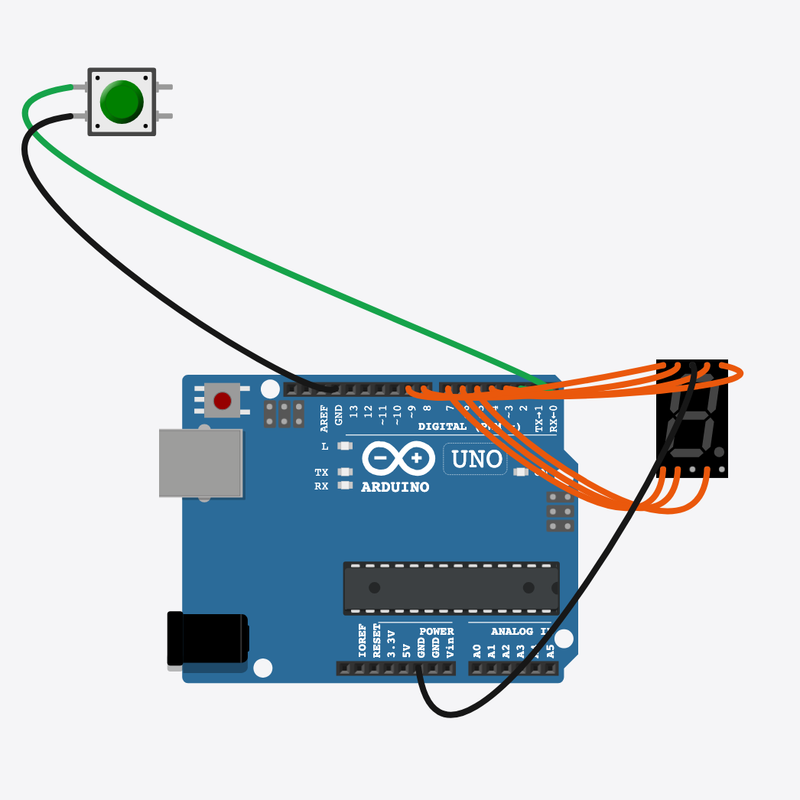
Pin connections
| Part 1 | Part 2 | |
|---|---|---|
Arduino pin 2 | → | Roll button pin 1 |
Roll button pin 2 | → | Arduino GND |
Arduino pin 3 | → | 7-segment display seg A |
Arduino pin 4 | → | 7-segment display seg B |
Arduino pin 5 | → | 7-segment display seg C |
Arduino pin 6 | → | 7-segment display seg D |
Arduino pin 7 | → | 7-segment display seg E |
Arduino pin 8 | → | 7-segment display seg F |
Arduino pin 9 | → | 7-segment display seg G |
7-segment display COM | → | Arduino GND |
Roll the dice with random()!
Press the button — random(1, 7) picks 1–6 on the display.
Board games and apps use random() for unpredictable outcomes.
The problem
You want a new number each press, not a fixed pattern.
Think of it like
Like shaking a real die — you cannot guess the next value.
Runs your sketch
Arduino
Brain
Triggers a new random roll
Roll button
Input
Shows die face 1–6
7-segment display
Display
Wait for press
Roll only when the player presses.
if (digitalRead(BUTTON_PIN) == LOW)
Pick random value
random(1, 7) gives 1 through 6 — perfect for a die.
int roll = random(1, 7);
Light segments
DIGITS[] table drives each segment ON/OFF for the number.
showDigit(roll);
Then loop back to step 1
Follow these steps in order. Match the wires to the colors shown.
Place Arduino
Place the Arduino (uno) on the breadboard.
Arduino placed!
Place Roll button
Place the Roll button (btn1) on the breadboard.
Place 7-segment display
Place the 7-segment display (seg1) on the breadboard.
Connect Arduino pin 2 to Roll button (btn1) 1.l
Connect Arduino pin 2 to Roll button (btn1) 1.l.
Connect Roll button (btn1) 2.l to Arduino GND
Connect Roll button (btn1) 2.l to Arduino GND.
Connect Arduino pin 3 to 7-segment display (seg1) anode (+)
Connect Arduino pin 3 to 7-segment display (seg1) anode (+).
Connect Arduino pin 4 to 7-segment display (seg1) B
Connect Arduino pin 4 to 7-segment display (seg1) B.
Connect Arduino pin 5 to 7-segment display (seg1) cathode (-)
Connect Arduino pin 5 to 7-segment display (seg1) cathode (-).
Connect Arduino pin 6 to 7-segment display (seg1) D
Connect Arduino pin 6 to 7-segment display (seg1) D.
Connect Arduino pin 7 to 7-segment display (seg1) E
Connect Arduino pin 7 to 7-segment display (seg1) E.
Connect Arduino pin 8 to 7-segment display (seg1) F
Connect Arduino pin 8 to 7-segment display (seg1) F.
Connect Arduino pin 9 to 7-segment display (seg1) G
Connect Arduino pin 9 to 7-segment display (seg1) G.
Connect 7-segment display (seg1) COM.2 to Arduino GND
Connect 7-segment display (seg1) COM.2 to Arduino GND.
Segment patterns
const uint8_t DIGITS[7] = {
  0b0000000,
  0b0000110,
  0b1011011,
  0b1001111,
  0b1100110,
  0b1101101,
  0b1111101,
};
Each digit is a bitmask — seven segments turn on/off to draw the number.
showDigit()
void showDigit(int digit) {
  uint8_t pattern = DIGITS[digit];
  for (int seg = 0; seg < 7; seg++) {
    digitalWrite(SEG_A + seg, (pattern >> seg) & 1);
  }
}
Loops segments and uses digitalWrite with bit math from the pattern.
Roll on button
void loop() {
  if (digitalRead(BUTTON_PIN) == LOW) {
    int roll = random(1, 7);
    showDigit(roll);
    while (digitalRead(BUTTON_PIN) == LOW) {
      delay(10);
    }
    delay(200);
  }
  delay(20);
}
Button triggers random(), then showDigit displays the result until next roll.
const int BUTTON_PIN = 2;
const int SEG_A = 3;
const uint8_t DIGITS[7] = {
  0b0000000,
  0b0000110,
  0b1011011,
  0b1001111,
  0b1100110,
  0b1101101,
  0b1111101,
};
void showDigit(int digit) {
  uint8_t pattern = DIGITS[digit];
  for (int seg = 0; seg < 7; seg++) {
    digitalWrite(SEG_A + seg, (pattern >> seg) & 1);
  }
}
void setup() {
  pinMode(BUTTON_PIN, INPUT_PULLUP);
  for (int i = 0; i < 7; i++) {
    pinMode(SEG_A + i, OUTPUT);
  }
  showDigit(1);
  randomSeed(analogRead(0));
}
void loop() {
  if (digitalRead(BUTTON_PIN) == LOW) {
    int roll = random(1, 7);
    showDigit(roll);
    while (digitalRead(BUTTON_PIN) == LOW) {
      delay(10);
    }
    delay(200);
  }
  delay(20);
}
Q1. Where does repeating work belong?
Q2. What does random(1, 7) return?
Add a comment on randomSeed line explaining different rolls each run.
Hint: Line 24 in setup().
Change the post-roll delay(200) to delay(400).
Hint: Line 33 in loop().
A line-by-line tour of the sketch — the same steps as in Robo Gurukul Studio.
Program overview
Technical
Sketches have globals, then setup() once, then loop() forever.
In this project
Roll a random number 1–6 on a 7-segment display when you press a button.
Why here
Read from top to bottom. Hover words or lines for help!
const int BUTTON_PIN = 2;
const int SEG_A = 3;
const uint8_t DIGITS[7] = {
  0b0000000,
  0b0000110,
  0b1011011,
  0b1001111,
  0b1100110,
  0b1101101,
  0b1111101,
};
void showDigit(int digit) {
  uint8_t pattern = DIGITS[digit];
  for (int seg = 0; seg < 7; seg++) {
    digitalWrite(SEG_A + seg, (pattern >> seg) & 1);
  }
}
setup()
Technical
Runs one time when the board turns on.
In this project
Sets up pins and libraries for Electronic Dice.
Why here
One-time setup belongs here—not in loop().
void setup() {
  pinMode(BUTTON_PIN, INPUT_PULLUP);
  for (int i = 0; i < 7; i++) {
    pinMode(SEG_A + i, OUTPUT);
  }
  showDigit(1);
  randomSeed(analogRead(0));
}
loop()
Technical
Runs again and again after setup() is done.
In this project
This is the main action you see in Electronic Dice.
Why here
Repeating work (blink, read sensors) goes here.
void loop() {
  if (digitalRead(BUTTON_PIN) == LOW) {
    int roll = random(1, 7);
    showDigit(roll);
    while (digitalRead(BUTTON_PIN) == LOW) {
      delay(10);
    }
    delay(200);
  }
  delay(20);
}
Try this: Change numbers in loop(), then compile and run the simulator.
pinMode
Technical
Tells a pin if it listens or drives something.
In this project
Gets the Electronic Dice circuit ready in the simulator.
Why here
Goes in setup() because we only set pins once at the start.
pinMode(BUTTON_PIN, INPUT_PULLUP);
digitalWrite
Technical
Turns a pin ON or OFF.
In this project
Controls lights, motors, or buzzers in Electronic Dice.
Why here
Goes in loop() so it can keep changing while the program runs.
digitalWrite(SEG_A + seg, (pattern >> seg) & 1);
digitalRead
Technical
Checks if a pin is ON or OFF.
In this project
Reads buttons or sensors in Electronic Dice.
Why here
Goes in loop() so we can react when something changes.
if (digitalRead(BUTTON_PIN) == LOW) {analogRead
Technical
Reads a sensor number from 0 to 1023.
In this project
Turns a sensor signal into a number for Electronic Dice.
Why here
Goes in loop() to keep checking the sensor.
randomSeed(analogRead(0));
delay
Technical
Waits for some time. Nothing else runs during the wait.
In this project
Controls speed so you can see Electronic Dice in the simulator.
Why here
Right after an action that should stay the same for a moment.
delay(10);
random
Technical
Picks a random number in a range.
In this project
Adds randomness in Electronic Dice.
Why here
In loop() when you want different values each time.
int roll = random(1, 7);