Runs your sketch
Arduino
Brain
Loading part…
game state with if decisions
Remember the Serial hint and press the correct button to grow your score.
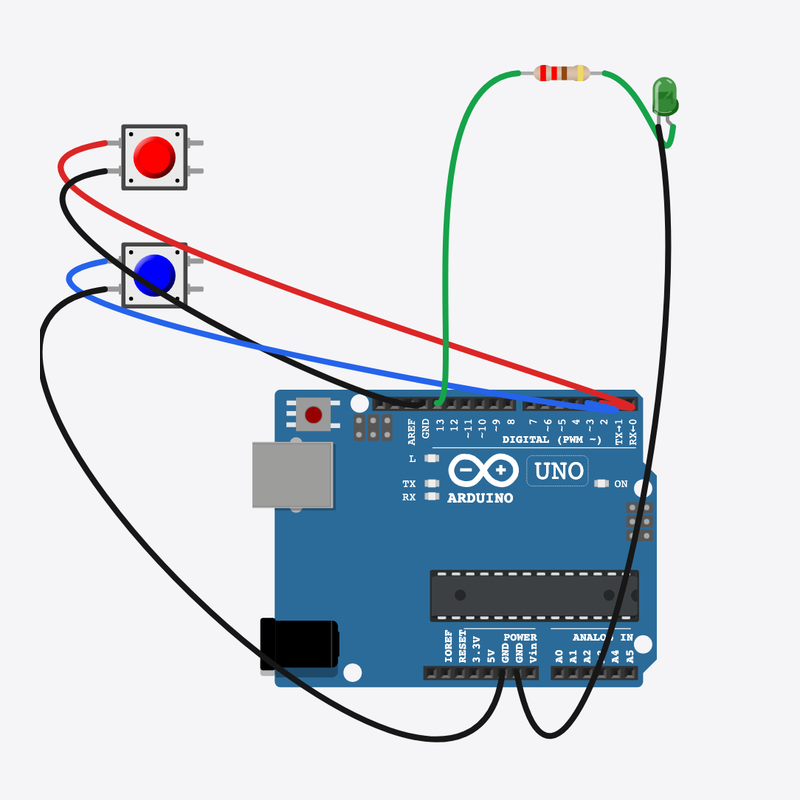
Pin connections
| Part 1 | Part 2 | |
|---|---|---|
Arduino pin 2 | → | Button A pin 1 |
Button A pin 2 | → | Arduino GND |
Arduino pin 3 | → | Button B pin 1 |
Button B pin 2 | → | Arduino GND |
Arduino pin 13 | → | Resistor pin 1 |
Resistor pin 2 | → | Score LED anode (+) |
Score LED cathode (-) | → | Arduino GND |
Remember and choose!
Serial hints “press A” or “press B” — pick the right button to grow your score.
Games keep state variables (score, waiting) and branch with if.
The problem
Programs need memory between loop passes — not just instant reads.
Think of it like
Like remembering a card color and picking the matching pile.
Runs your sketch
Arduino
Brain
Choice A in the memory game
Button A
Input
Choice B in the memory game
Button B
Input
Protects the score LED
Resistor
Safety
Flashes on correct answers
Score LED
Output
Pick target
pickNext() secretly chooses A or B and prints a hint.
lastChoice = random(0, 2);
Wait for input
Only while waiting is true do button presses count.
if (waiting && digitalRead(BTN_A) == LOW)
Score or reset
Correct if grows score; wrong if clears it — game state with if.
if (choice == lastChoice) score++; else score = 0;
Then loop back to step 1
Follow these steps in order. Match the wires to the colors shown.
Place Arduino
Place the Arduino (uno) on the breadboard.
Arduino placed!
Place Button A
Place the Button A (btnA) on the breadboard.
Place Button B
Place the Button B (btnB) on the breadboard.
Place Resistor
Place the Resistor (r1) on the breadboard.
Place Score LED
Place the Score LED (led1) on the breadboard.
Connect Arduino pin 2 to Button A (btnA) 1.l
Connect Arduino pin 2 to Button A (btnA) 1.l.
Connect Button A (btnA) 2.l to Arduino GND
Connect Button A (btnA) 2.l to Arduino GND.
Connect Arduino pin 3 to Button B (btnB) 1.l
Connect Arduino pin 3 to Button B (btnB) 1.l.
Connect Button B (btnB) 2.l to Arduino GND
Connect Button B (btnB) 2.l to Arduino GND.
Connect Arduino pin 13 to Resistor (r1) 1
Connect Arduino pin 13 to Resistor (r1) 1.
Connect Resistor (r1) 2 to Score LED (led1) anode (+)
Connect Resistor (r1) 2 to Score LED (led1) anode (+).
Connect Score LED (led1) cathode (-) to Arduino GND
Connect Score LED (led1) cathode (-) to Arduino GND.
Game variables
int lastChoice = 0;
int score = 0;
bool waiting = true;
lastChoice, score, and waiting remember the game between loop() calls.
check()
void check(int choice) {
  waiting = false;
  if (choice == lastChoice) {
    score++;
    digitalWrite(SCORE_LED, HIGH);
    Serial.print("Correct! Score: ");
    Serial.println(score);
  } else {
    score = 0;
    digitalWrite(SCORE_LED, LOW);
    Serial.println("Wrong — score reset");
  }
  delay(800);
  digitalWrite(SCORE_LED, LOW);
  delay(400);
  pickNext();
  while (digitalRead(BTN_A) == LOW || digitalRead(BTN_B) == LOW) {
    delay(10);
  }
}
Compares choice to lastChoice and updates score and LED feedback.
Main loop
void loop() {
  if (waiting && digitalRead(BTN_A) == LOW) {
    check(0);
  } else if (waiting && digitalRead(BTN_B) == LOW) {
    check(1);
  }
  delay(20);
}
Routes button A or B to check() only when waiting for an answer.
const int BTN_A = 2;
const int BTN_B = 3;
const int SCORE_LED = 13;
int lastChoice = 0;
int score = 0;
bool waiting = true;
void pickNext() {
  lastChoice = random(0, 2);
  waiting = true;
  Serial.println(lastChoice == 0 ? "Hint: press A" : "Hint: press B");
}
void check(int choice) {
  waiting = false;
  if (choice == lastChoice) {
    score++;
    digitalWrite(SCORE_LED, HIGH);
    Serial.print("Correct! Score: ");
    Serial.println(score);
  } else {
    score = 0;
    digitalWrite(SCORE_LED, LOW);
    Serial.println("Wrong — score reset");
  }
  delay(800);
  digitalWrite(SCORE_LED, LOW);
  delay(400);
  pickNext();
  while (digitalRead(BTN_A) == LOW || digitalRead(BTN_B) == LOW) {
    delay(10);
  }
}
void setup() {
  pinMode(BTN_A, INPUT_PULLUP);
  pinMode(BTN_B, INPUT_PULLUP);
  pinMode(SCORE_LED, OUTPUT);
  Serial.begin(9600);
  randomSeed(analogRead(0));
  Serial.println("Memory Game — match the hint!");
  pickNext();
}
void loop() {
  if (waiting && digitalRead(BTN_A) == LOW) {
    check(0);
  } else if (waiting && digitalRead(BTN_B) == LOW) {
    check(1);
  }
  delay(20);
}
Q1. Where does repeating work belong?
Q2. What does the waiting variable control?
Change the hint text on line 10 to include the word “Remember”.
Hint: Edit the Serial.println in pickNext().
Give more time after a wrong answer — change delay(800) to delay(1200) in check().
Hint: Line 24.
A line-by-line tour of the sketch — the same steps as in Robo Gurukul Studio.
Program overview
Technical
Sketches have globals, then setup() once, then loop() forever.
In this project
Remember the Serial hint and press the correct button to grow your score.
Why here
Read from top to bottom. Hover words or lines for help!
const int BTN_A = 2;
const int BTN_B = 3;
const int SCORE_LED = 13;
int lastChoice = 0;
int score = 0;
bool waiting = true;
void pickNext() {
  lastChoice = random(0, 2);
  waiting = true;
  Serial.println(lastChoice == 0 ? "Hint: press A" : "Hint: press B");
}
void check(int choice) {
  waiting = false;
  if (choice == lastChoice) {
    score++;
    digitalWrite(SCORE_LED, HIGH);
    Serial.print("Correct! Score: ");
    Serial.println(score);
  } else {
    score = 0;
    digitalWrite(SCORE_LED, LOW);
    Serial.println("Wrong — score reset");
  }
  delay(800);
  digitalWrite(SCORE_LED, LOW);
  delay(400);
  pickNext();
  while (digitalRead(BTN_A) == LOW || digitalRead(BTN_B) == LOW) {
    delay(10);
  }
}
setup()
Technical
Runs one time when the board turns on.
In this project
Sets up pins and libraries for Memory Game.
Why here
One-time setup belongs here—not in loop().
void setup() {
  pinMode(BTN_A, INPUT_PULLUP);
  pinMode(BTN_B, INPUT_PULLUP);
  pinMode(SCORE_LED, OUTPUT);
  Serial.begin(9600);
  randomSeed(analogRead(0));
  Serial.println("Memory Game — match the hint!");
  pickNext();
}
loop()
Technical
Runs again and again after setup() is done.
In this project
This is the main action you see in Memory Game.
Why here
Repeating work (blink, read sensors) goes here.
void loop() {
  if (waiting && digitalRead(BTN_A) == LOW) {
    check(0);
  } else if (waiting && digitalRead(BTN_B) == LOW) {
    check(1);
  }
  delay(20);
}
Try this: Change numbers in loop(), then compile and run the simulator.
pinMode
Technical
Tells a pin if it listens or drives something.
In this project
Gets the Memory Game circuit ready in the simulator.
Why here
Goes in setup() because we only set pins once at the start.
pinMode(BTN_A, INPUT_PULLUP);
digitalWrite
Technical
Turns a pin ON or OFF.
In this project
Controls lights, motors, or buzzers in Memory Game.
Why here
Goes in loop() so it can keep changing while the program runs.
digitalWrite(SCORE_LED, HIGH);
digitalRead
Technical
Checks if a pin is ON or OFF.
In this project
Reads buttons or sensors in Memory Game.
Why here
Goes in loop() so we can react when something changes.
while (digitalRead(BTN_A) == LOW || digitalRead(BTN_B) == LOW) {analogRead
Technical
Reads a sensor number from 0 to 1023.
In this project
Turns a sensor signal into a number for Memory Game.
Why here
Goes in loop() to keep checking the sensor.
randomSeed(analogRead(0));
delay
Technical
Waits for some time. Nothing else runs during the wait.
In this project
Controls speed so you can see Memory Game in the simulator.
Why here
Right after an action that should stay the same for a moment.
delay(800);
random
Technical
Picks a random number in a range.
In this project
Adds randomness in Memory Game.
Why here
In loop() when you want different values each time.
lastChoice = random(0, 2);
begin
Technical
Starts talking to the computer screen (serial monitor).
In this project
Lets Memory Game print debug messages.
Why here
Goes in setup() once before any Serial.print.
Serial.begin(9600);
Technical
Sends text to the serial monitor without a new line.
In this project
Shows values from Memory Game on the screen.
Why here
In loop() or setup() when you want to see what the board is doing.
Serial.print("Correct! Score: ");println
Technical
Sends text to the serial monitor and starts a new line.
In this project
Prints one line of output for Memory Game.
Why here
In loop() when each reading should appear on its own line.
Serial.println(lastChoice == 0 ? "Hint: press A" : "Hint: press B");